Latex符号大全
Latex 符号大全
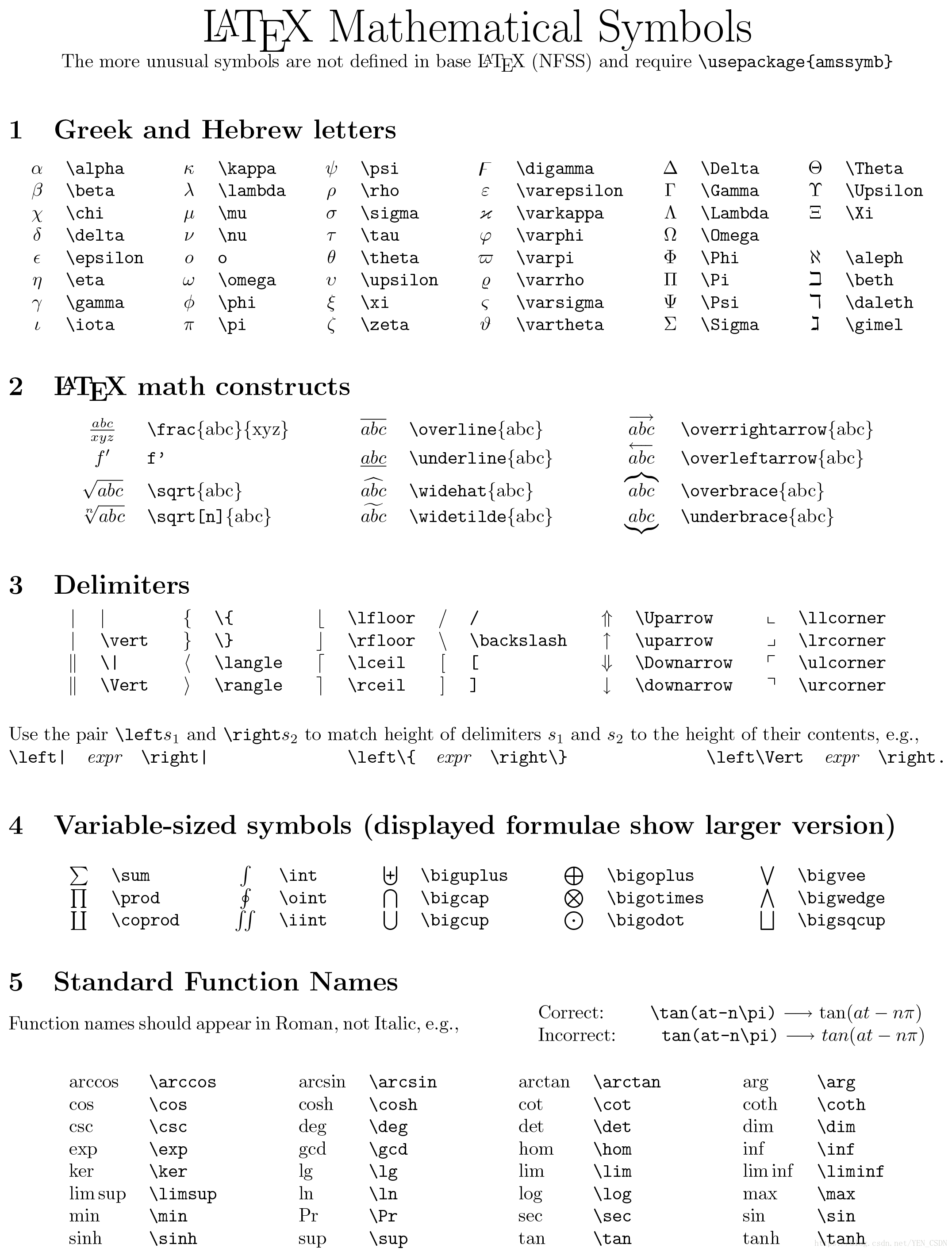
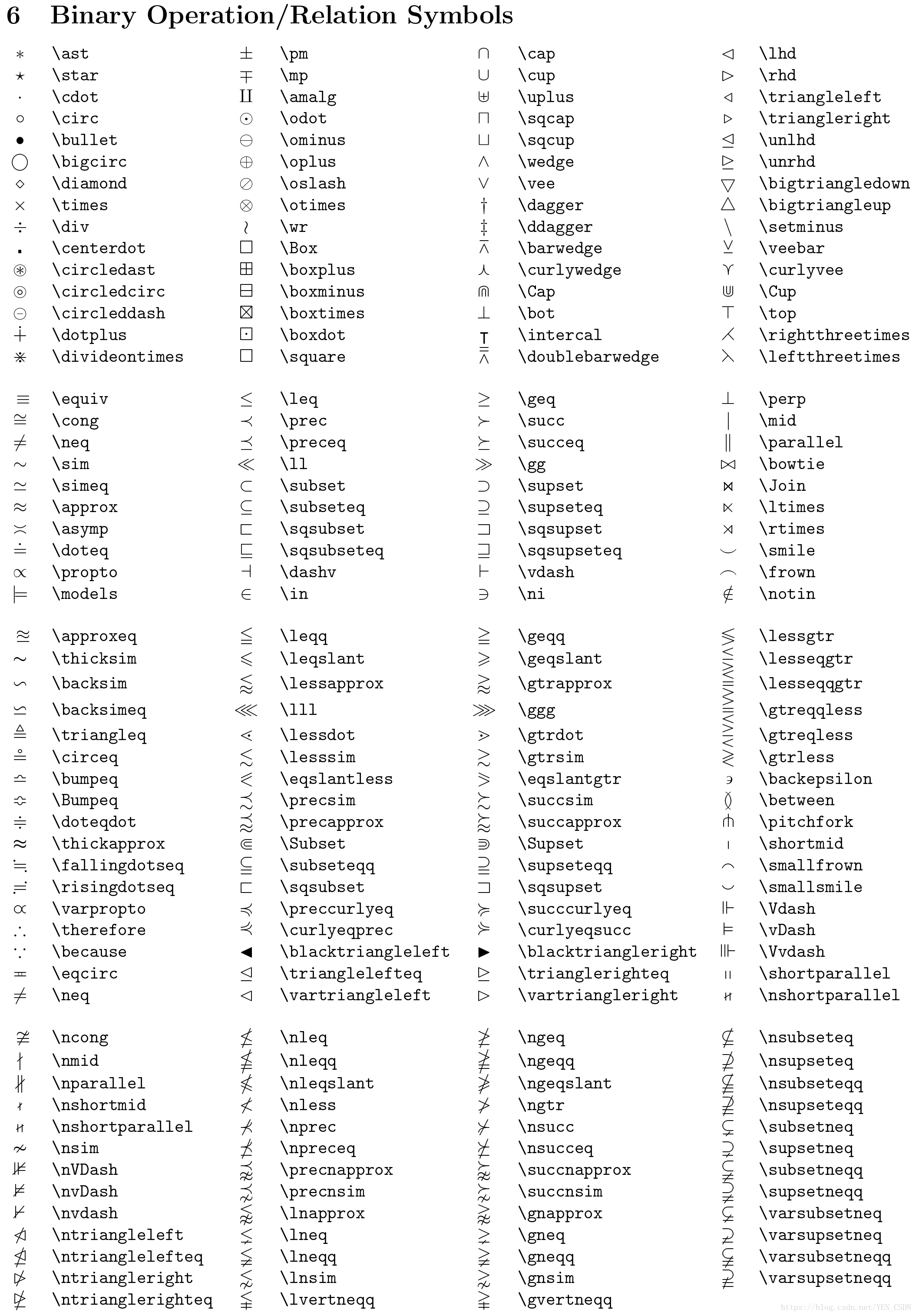
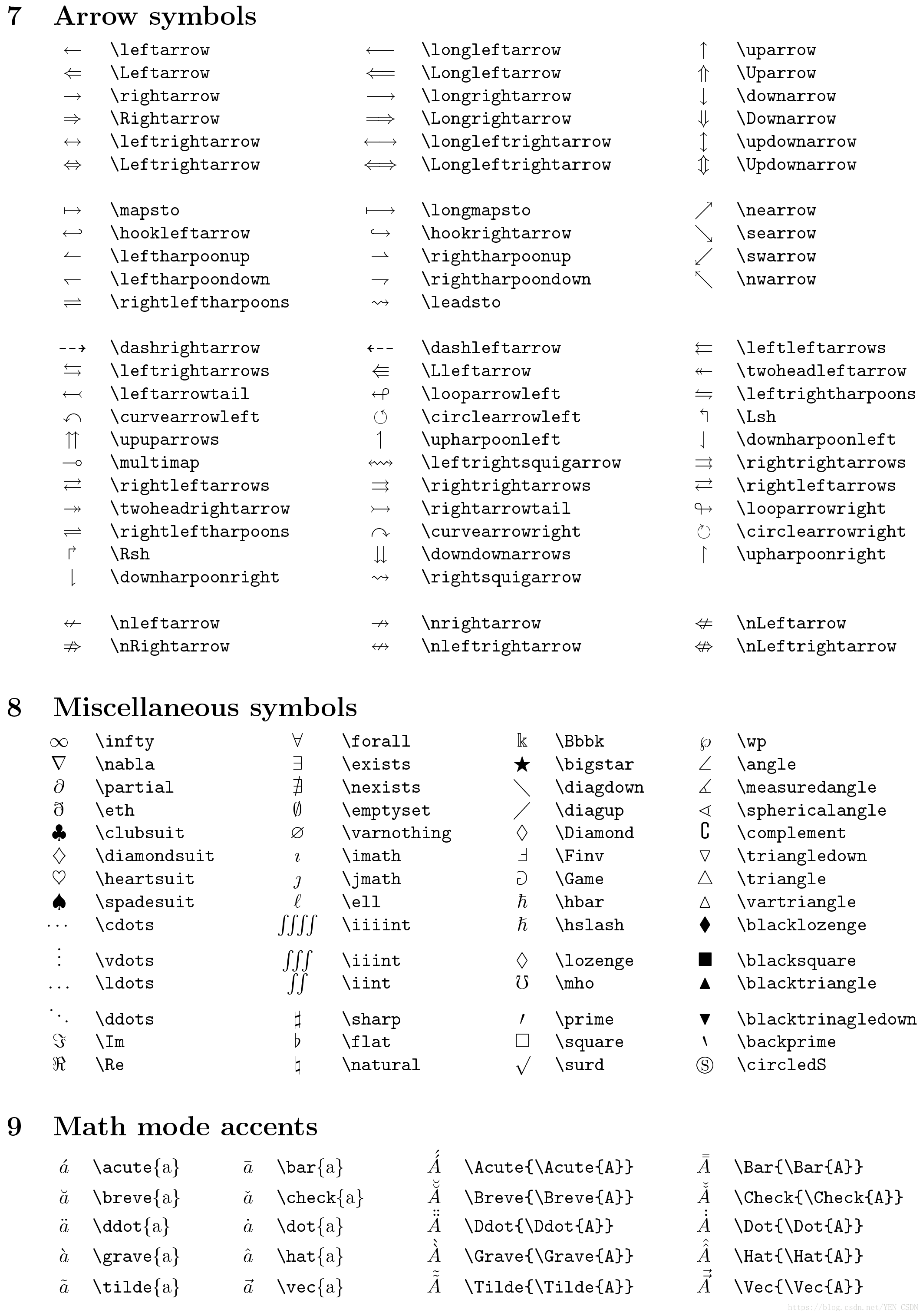
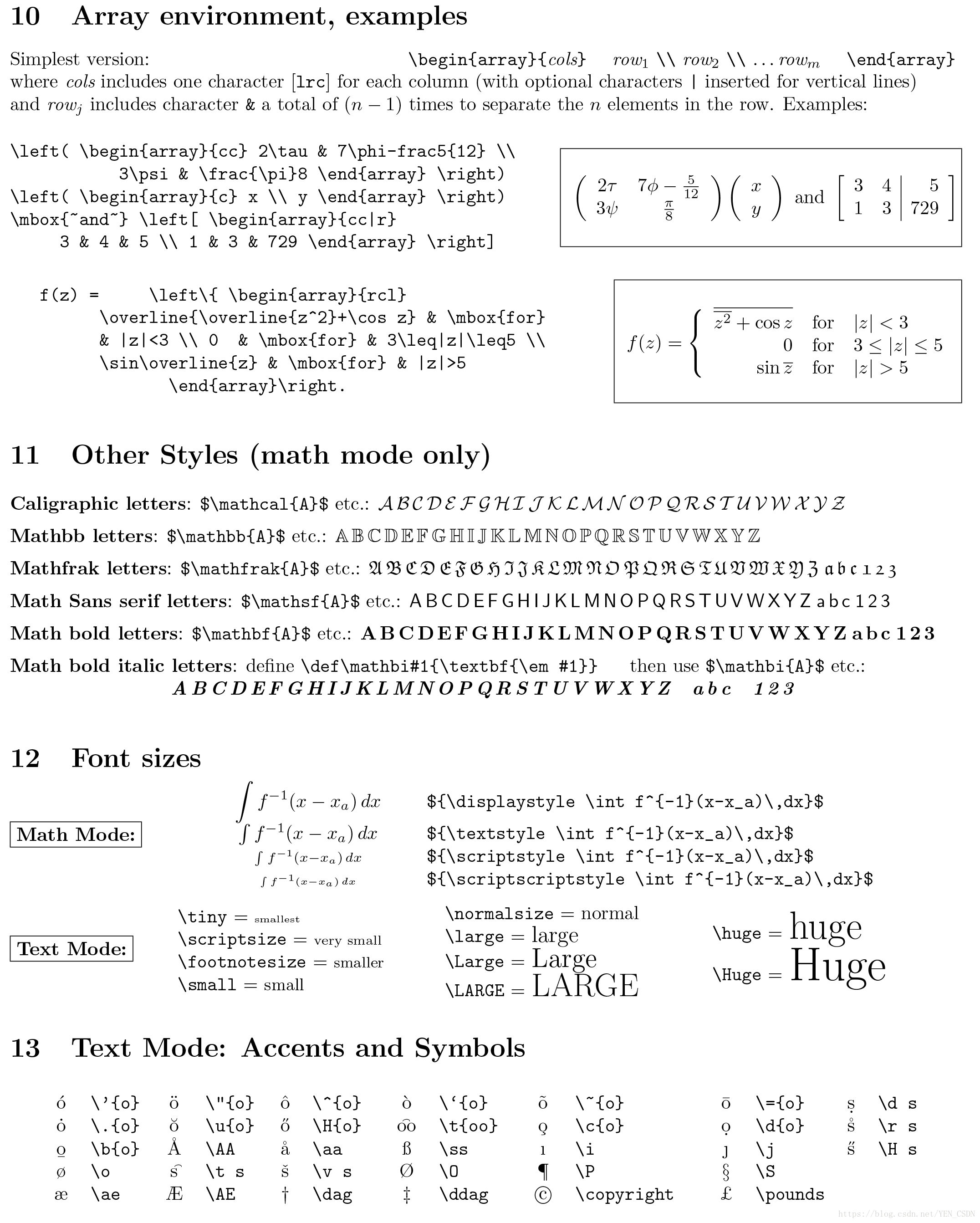
Operators
| Symbol | Command | Symbol | Command | Symbol | Command |
|---|---|---|---|---|---|
\pm |
\mp |
\times |
|||
\div |
\cdot |
\ast |
|||
\star |
\dagger |
\ddagger |
|||
\amalg |
\cap |
\cup |
|||
\uplus |
\sqcap |
\sqcup |
|||
\vee |
\wedge |
\oplus |
|||
\ominus |
\otimes |
\circ |
|||
\bullet |
\diamond |
\lhd |
|||
\rhd |
\unlhd |
\unrhd |
|||
\oslash |
\odot |
\bigcirc |
|||
\triangleleft |
\Diamond |
\bigtriangleup |
|||
\bigtriangledown |
\Box |
\triangleright |
|||
\setminus |
\wr |
\sqrt{x} |
|||
x^{\circ} |
\triangledown |
\sqrt[n]{x} |
|||
a^x |
a^{xyz} |
a_x |
Relations
| Symbol | Command | Symbol | Command | Symbol | Command |
|---|---|---|---|---|---|
\le |
\ge |
\neq |
|||
\sim |
\ll |
\gg |
|||
\doteq |
\simeq |
\subset |
|||
\supset |
\approx |
\asymp |
|||
\subseteq |
\supseteq |
\cong |
|||
\smile |
\sqsubset |
\sqsupset |
|||
\equiv |
\frown |
\sqsubseteq |
|||
\sqsupseteq |
\propto |
\bowtie |
|||
\in |
\ni |
\prec |
|||
\succ |
\vdash |
\dashv |
|||
\preceq |
\succeq |
\models |
|||
\perp |
\parallel |
||||
\mid |
\bumpeq |
Negations of many of these relations can be formed by just putting \not before the symbol, or by slipping an "n" between the \ and the word. Here are a couple examples, plus many other negations; it works for many of the many others as well.
| Symbol | Command | Symbol | Command | Symbol | Command |
|---|---|---|---|---|---|
\nmid |
\nleq |
\ngeq |
|||
\nsim |
\ncong |
\nparallel |
|||
\not< |
\not> |
\not= or \neq or \ne |
|||
\not\le |
\not\ge |
\not\sim |
|||
\not\approx |
\not\cong |
\not\equiv |
|||
\not\parallel |
\nless |
\ngtr |
|||
\lneq |
\gneq |
\lnsim |
|||
\lneqq |
\gneqq |
To use other relations not listed here, such as =, >, and <, in LaTeX, you must use the symbols on your keyboard, as they are not available in .
Greek Letters
Lowercase Letters
| Symbol | Command | Symbol | Command | Symbol | Command | Symbol | Command |
|---|---|---|---|---|---|---|---|
\alpha |
\beta |
\gamma |
\delta |
||||
\epsilon |
\varepsilon |
\zeta |
\eta |
||||
\theta |
\vartheta |
\iota |
\kappa |
||||
\lambda |
\mu |
\nu |
\xi |
||||
\pi |
\varpi |
\rho |
\varrho |
||||
\sigma |
\varsigma |
\tau |
\upsilon |
||||
\phi |
\varphi |
\chi |
\psi |
||||
\omega |
Capital Letters
| Symbol | Command | Symbol | Command | Symbol | Command | Symbol | Command |
|---|---|---|---|---|---|---|---|
\Gamma |
\Delta |
\Theta |
\Lambda |
||||
\Xi |
\Pi |
\Sigma |
\Upsilon |
||||
\Phi |
\Psi |
\Omega |
Arrows
| Symbol | Command | Symbol | Command |
|---|---|---|---|
\gets |
\to |
||
\leftarrow |
\Leftarrow |
||
\rightarrow |
\Rightarrow |
||
\leftrightarrow |
\Leftrightarrow |
||
\mapsto |
\hookleftarrow |
||
\leftharpoonup |
\leftharpoondown |
||
\rightleftharpoons |
\longleftarrow |
||
\Longleftarrow |
\longrightarrow |
||
\Longrightarrow |
\longleftrightarrow |
||
\Longleftrightarrow |
\longmapsto |
||
\hookrightarrow |
\rightharpoonup |
||
\rightharpoondown |
\leadsto |
||
\uparrow |
\Uparrow |
||
\downarrow |
\Downarrow |
||
\updownarrow |
\Updownarrow |
||
\nearrow |
\searrow |
||
\swarrow |
\nwarrow |
||
\overrightarrow{AB} |
\overleftarrow{AB} |
||
\overleftrightarrow{AB} |
(For those of you who hate typing long strings of letters, \iff and \implies can be used in place of \Longleftrightarrow and \Longrightarrow respectively.)
Dots
| Symbol | Command | Symbol | Command |
|---|---|---|---|
\cdot |
\vdots |
||
\dots |
\ddots |
||
\cdots |
\iddots |
Accents
| Symbol | Command | Symbol | Command | Symbol | Command |
|---|---|---|---|---|---|
\hat{x} |
\check{x} |
\dot{x} |
|||
\breve{x} |
\acute{x} |
\ddot{x} |
|||
\grave{x} |
\tilde{x} |
\mathring{x} |
|||
\bar{x} |
\vec{x} |
When applying accents to i and j, you can use \imath and \jmath to keep the dots from interfering with the accents:
| Symbol | Command | Symbol | Command |
|---|---|---|---|
\vec{\jmath} |
\tilde{\imath} |
\tilde and \hat have wide versions that allow you to accent an expression:
| Symbol | Command | Symbol | Command |
|---|---|---|---|
\widehat{7+x} |
\widetilde{abc} |
Others
| Symbol | Command | Symbol | Command | Symbol | Command |
|---|---|---|---|---|---|
\infty |
\triangle |
\angle |
|||
\aleph |
\hbar |
\imath |
|||
\jmath |
\ell |
\wp |
|||
\Re |
\Im |
\mho |
|||
\prime |
\emptyset |
\nabla |
|||
\surd |
\partial |
\top |
|||
\bot |
\vdash |
\dashv |
|||
\forall |
\exists |
\neg |
|||
\flat |
\natural |
\sharp |
|||
\backslash |
\Box |
\Diamond |
|||
\clubsuit |
\diamondsuit |
\heartsuit |
|||
\spadesuit |
\Join |
\blacksquare |
|||
\diamondsuit |
\copyright |
\underarc{XYZ} |
|||
\heartsuit |
\overarc{ABC} |
\cup |
|||
\S |
\P |
\Vdash |
|||
\pounds |
\in |
\vDash |
|||
\bigstar |
\implies |
||||
\square |
|||||
\smiley |
|||||
\mathbb{R} (represents all real numbers) |
|||||
\checkmark |
|||||
\cancer |
Note: and do not work in the classroom.
Command Symbols
Some symbols are used in commands, so they need to be treated in a special way.
| Symbol | Command | Symbol | Command | Symbol | Command | Symbol | Command |
|---|---|---|---|---|---|---|---|
\textdollar or $ |
\& |
\% |
\# |
||||
\_ |
\{ |
\} |
\backslash |
(Warning: Using \textdollarwill result in $$. This is a bug as far as we know. Depending on the version of\LaTeX$ this is not always a problem.)
European Language Symbols
| Symbol | Command | Symbol | Command | Symbol | Command | Symbol | Command |
|---|---|---|---|---|---|---|---|
| {\oe} | {\ae} | {\o} | |||||
| {\OE} | {\AE} | {\AA} | {\O} | ||||
| {\l} | {\ss} | !` | |||||
| {\L} | {\SS} |
Bracketing Symbols
In mathematics, sometimes we need to enclose expressions in brackets, braces or parentheses. Some of these work just as you'd imagine in LaTeX; type ( and ) for parentheses, [ and ] for brackets, and | and | for absolute value. However, other symbols have special commands:
| Symbol | Command | Symbol | Command | Symbol | Command |
|---|---|---|---|---|---|
\{ |
\} |
| |
|||
\backslash |
\lfloor |
\rfloor |
|||
\lceil |
\rceil |
\langle |
|||
\rangle |
You might notice that if you use any of these to typeset an expression that is vertically large, like
(\frac{a}{x} )^2the parentheses don't come out the right size:
If we put \left and \right before the relevant parentheses, we get a prettier expression:
\left(\frac{a}{x} \right)^2gives
For systems of equations or piecewise functions, use the cases environment:
f(x) = \begin{cases} x^2 & x \ge 0 \\ x & x < 0 \end{cases}which gives
In addition to the \left and \right commands, when doing floor or ceiling functions with fractions, using \left\lceil\frac{x}{y}\right\rceil and \left\lfloor\frac{x}{y}\right\rfloor
gives both and , respectively.
And, if you type this
\underbrace{a_0+a_1+a_2+\cdots+a_n}_{x}Gives
Or
\overbrace{a_0+a_1+a_2+\cdots+a_n}^{x}Gives
\left and \right can also be used to resize the following symbols:
| Symbol | Command | Symbol | Command | Symbol | Command |
|---|---|---|---|---|---|
\uparrow |
\downarrow |
\updownarrow |
|||
\Uparrow |
\Downarrow |
\Updownarrow |
Multi-Size Symbols
Some symbols render differently in inline math mode and in display mode. Display mode occurs when you use \[...\] or $$...$$, or environments like
[...]
,
. Read more in the commands section of the guide about how symbols which take arguments above and below the symbols, such as a summation symbol, behave in the two modes.
In each of the following, the two images show the symbol in display mode, then in inline mode.
-
\sum -
\int -
\oint -
\prod -
\coprod -
\bigcap -
\bigcup -
\bigsqcup -
\bigvee -
\bigwedge -
\bigodot -
\bigotimes -
\bigoplus -
\biguplus